

Google’s NotebookLM has launched two significant updates : Video Overviews and an upgraded Studio panel that allows users to create multiple outputs from the same source material.
NotebookLM, which Google calls a “personalized AI research assistant,” is an AI model with some major differences between it and the major LLMs like ChatGPT, Claude, and Google’s own Gemini. NotebookLM works with only the “sources” you upload, not knowledge gained from the wider internet. This makes it more focuses and less prone to hallucinations.
Although NotebookLM can generate a variety of content, it’s been best known for its remarkably human-sounding, podcast-like Audio Overviews. Two realistic, engaging AI hosts discuss your content in a way that you can customize.
Video Overviews: Visual Learning Made Simple
When I heard that Video Overviews were coming, I thought Google might add human avatars to the Audio Overviews. That seemed fairly straightforward using technology like that of HeyGen or ElevenLabs. I’d simulated that concept with a bit of manual editing, and the result was fairly pleasing. The process was complicated only by the male and female host voices being intermingled in a single audio stream, a factor which wouldn’t hamper Google’s ability to add avatars.
Instead, Google has taken a different direction for Video Overviews. Rather than a video podcast look with two hosts conversing on a split screen, the new feature creates a narrated slideshow.
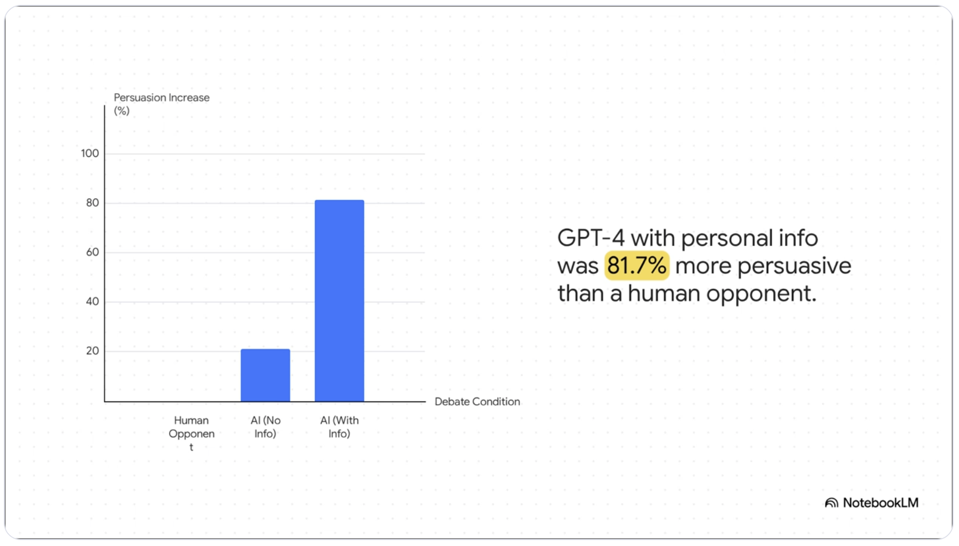
NotebookLM creates PowerPoint-like slides that combine AI-generated visuals with images, diagrams, quotes and numbers from the source documents.
Users can customize these videos just as they do with Audio Overviews. You can specify topics to focus on, indicate your learning goals, describe the target audience and much more. The system handles both basic requests (“help me understand the key findings in the paper”) and expert-level customization (“Explain the research methodology for an audience of behavioral scientists”).
Tailored Content From the Same Source Material
The upgraded Studio panel solves a significant limitation: until now, you could only create one of each per notebook, which could be limiting. If you used the sources to create a beginner’s guide, you would lose that if you created a new overview tailored to experts. Now users can generate and store multiple outputs of the same type within a single notebook.
This enables practical applications across organizations:
- Global Teams: Create Audio Overviews in different languages from the same source material.
- Role-Based Training: Generate customized briefings for different departments from company documentation.
- Marketing Teams: Transform market research into stakeholder-specific presentations.
- Educational Settings: Create chapter-specific study materials from course content.
The interface includes four tiles at the top of the Studio panel for creating Audio Overviews, Video Overviews, Mind Maps, and Reports with a single click. Users can now multitask within the panel—listening to an Audio Overview while reviewing a Mind Map, for example.
Business Applications Worth Noting
These features offer concrete benefits in a variety of situations. Marketing teams can upload competitive analyses and generate video summaries for stakeholder meetings. Product teams can transform technical specifications into accessible overviews. HR departments can create role-specific training materials from policy documents. My favorite use is turning lengthy, jargon-laden academic research into shorter, more digestible formats.
The ability to generate multiple outputs lets one make complex information accessible to audiences with different expertise levels and learning preferences.
Availability and Next Steps
Video Overviews are now rolling out to all users in English, and support for more languages is coming soon. The redesigned Studio panel will reach all users over the coming weeks.
Though less-well known than the major AI models, NotebookLM is a remarkably versatile tool. One personal example: I dropped the 350-page manual for my new car into a notebook. When I’m puzzled by how to change a setting buried in a third-level touchscreen menu, I ask NotebookLM and get an instant reference. That’s much easier and faster than trying to locate the information in the enormous PDF from the car maker.
Overall, I think Google’s calling NotebookLM a “personalized AI research assistant” is a bit of a misnomer. Where the tool shines isn’t doing research. Rather, it is taking research you (or another AI) has gathered and extracting information and/or making the information highly accessible to a variety of audiences. The new features are another step in that direction.